React Email
React Email is a library that allows you to use React components to create emails.
When running on Bun, we can directly write a React Email component and import the JSX directly into our code to send emails.
Installation
Section titled “Installation”To install React Email, run the following command:
bun add -d react-emailbun add @react-email/components react react-domThen add this script to package.json:
{ "scripts": { "email": "email dev --dir src/emails" }}We recommend adding email templates into the src/emails directory as we can directly import the JSX files.
TypeScript
Section titled “TypeScript”If you are using TypeScript, you may need to add the following to your tsconfig.json:
{ "compilerOptions": { "jsx": "react" }}Your first email
Section titled “Your first email”Create the file src/emails/otp.tsx with the following code:
import * as React from 'react'import { Tailwind, Section, Text } from '@react-email/components'
export default function OTPEmail({ otp }: { otp: number }) {    return (        <Tailwind>            <Section className="flex justify-center items-center w-full min-h-screen font-sans">                <Section className="flex flex-col items-center w-76 rounded-2xl px-6 py-1 bg-mauve-50">                    <Text className="text-xs font-medium text-violet-500">                        Verify your Email Address                    </Text>                    <Text className="text-mauve-500 my-0">                        Use the following code to verify your email address                    </Text>                    <Text className="text-5xl font-bold pt-2">{otp}</Text>                    <Text className="text-mauve-400 font-light text-xs pb-4">                        This code is valid for 10 minutes                    </Text>                    <Text className="text-mauve-600 text-xs">                        Thank you for joining us                    </Text>                </Section>            </Section>        </Tailwind>    )}
OTPEmail.PreviewProps = {    otp: 123456}
You may notice that we are using @react-email/components to create the email template.
This library provides a set of components including styling with Tailwind that are compatible with email clients like Gmail, Outlook, etc.
We also added PreviewProps to the OTPEmail function. This only applies when previewing the email on our playground.
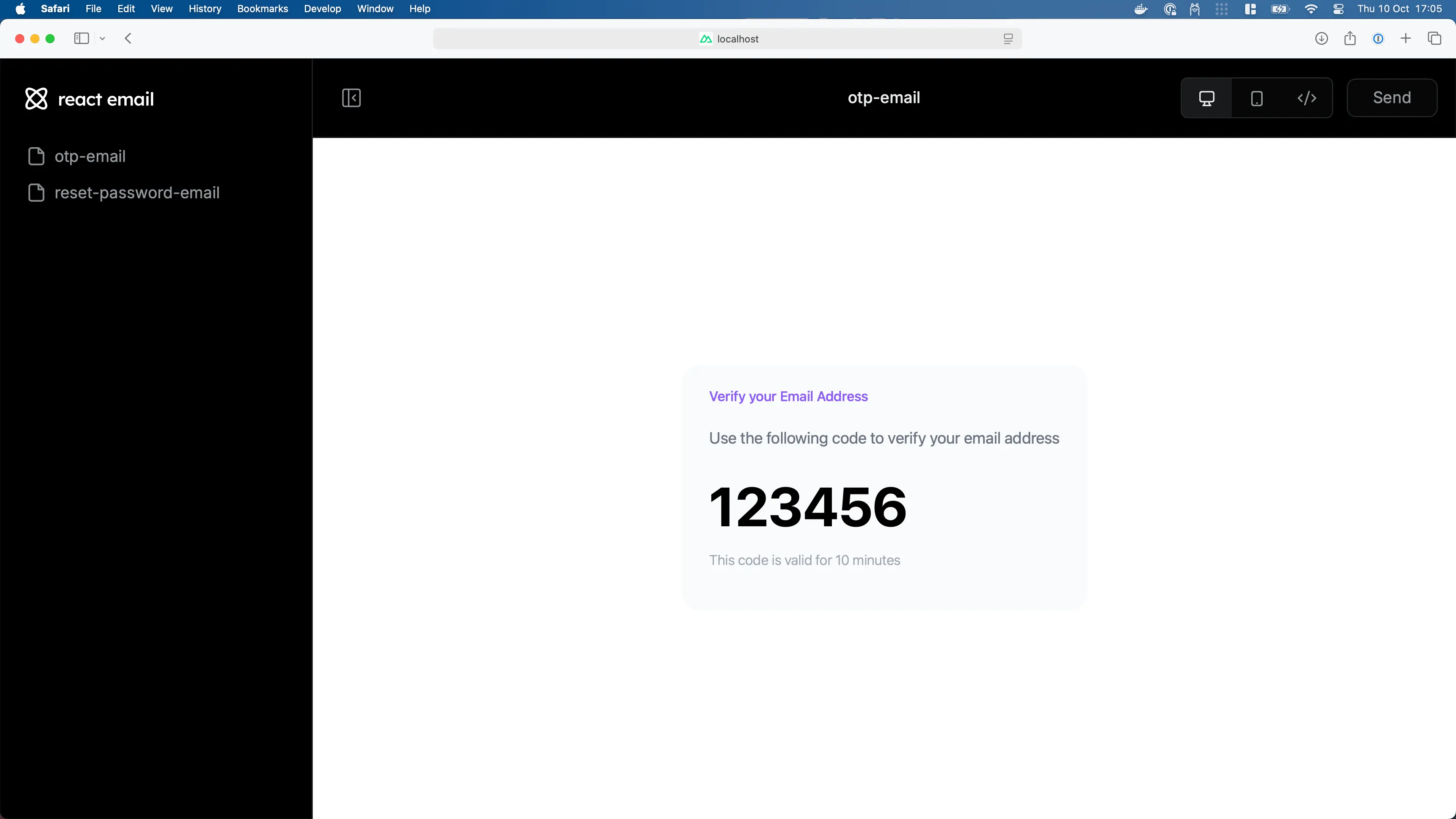
Preview your email
Section titled “Preview your email”To preview your email, run the following command:
bun emailThis will open a browser window with the preview of your email.
Sending email
Section titled “Sending email”These examples show provider delivery. Before using them for sign-in, store an expiring, single-use code for the requesting account and rate-limit generation and verification.
To send an email, we can use react-dom/server to render the email, then submit it using a preferred provider:
import { Elysia, t } from 'elysia'import { randomInt } from 'node:crypto'
import * as React from 'react'import { renderToStaticMarkup } from 'react-dom/server'
import OTPEmail from './emails/otp'
import nodemailer from 'nodemailer'
const transporter = nodemailer.createTransport({ host: 'smtp.gehenna.sh', port: 465, auth: { user: process.env.SMTP_USER, pass: process.env.SMTP_PASSWORD }})
new Elysia() .post('/otp', { body: t.String({ format: 'email' }) }, async ({ body }) => { // Random between 100,000 and 999,999 const otp = randomInt(100_000, 1_000_000)
const html = renderToStaticMarkup(<OTPEmail otp={otp} />)
await transporter.sendMail({ to: body, subject: 'Verify your email address', html, })
return { success: true } }) .listen(3000)import { Elysia, t } from 'elysia'import { randomInt } from 'node:crypto'import * as React from 'react'
import OTPEmail from './emails/otp'
import { Resend } from 'resend'
const resend = new Resend(process.env.RESEND_API_KEY)
new Elysia() .post('/otp', { body: t.String({ format: 'email' }) }, async ({ body }) => { // Random between 100,000 and 999,999 const otp = randomInt(100_000, 1_000_000)
await resend.emails.send({ to: body, subject: 'Verify your email address', react: <OTPEmail otp={otp} />, })
return { success: true } }) .listen(3000)import { Elysia, t } from 'elysia'import { randomInt } from 'node:crypto'
import * as React from 'react'import { renderToStaticMarkup } from 'react-dom/server'
import OTPEmail from './emails/otp'
import { type SendEmailCommandInput, SES } from '@aws-sdk/client-ses'import { fromEnv } from '@aws-sdk/credential-providers'
const ses = new SES({ credentials: process.env.NODE_ENV === 'production' ? fromEnv() : undefined})
new Elysia() .post('/otp', { body: t.String({ format: 'email' }) }, async ({ body }) => { // Random between 100,000 and 999,999 const otp = randomInt(100_000, 1_000_000)
const html = renderToStaticMarkup(<OTPEmail otp={otp} />)
await ses.sendEmail({ Destination: { ToAddresses: [body] }, Message: { Body: { Html: { Charset: 'UTF-8', Data: html } }, Subject: { Charset: 'UTF-8', Data: 'Verify your email address' } } } satisfies SendEmailCommandInput)
return { success: true } }) .listen(3000)import { Elysia, t } from 'elysia'import { randomInt } from 'node:crypto'
import * as React from 'react'import { renderToStaticMarkup } from 'react-dom/server'import OTPEmail from './emails/otp'
import sendgrid from "@sendgrid/mail"
sendgrid.setApiKey(process.env.SENDGRID_API_KEY)
new Elysia() .post('/otp', { body: t.String({ format: 'email' }) }, async ({ body }) => { // Random between 100,000 and 999,999 const otp = randomInt(100_000, 1_000_000)
const html = renderToStaticMarkup(<OTPEmail otp={otp} />)
await sendgrid.send({ to: body, subject: 'Verify your email address', html })
return { success: true } }) .listen(3000)You may see all of the available integrations with React Email in the React Email Integrations, and learn more about React Email in the React Email documentation