


Prisma is a renowned TypeScript ORM for its developer experience.
It has a type-safe and intuitive API that allows us to interact with databases using a fluent and natural syntax.
Writing a database query is as simple as writing a shape of data with TypeScript auto-completion, then Prisma takes care of the rest by generating efficient SQL queries and handling database connections in the background.
One of the standout features of Prisma is its seamless integration with popular databases like:
- PostgreSQL
- MySQL
- SQLite
- SQL Server
- MongoDB
- CockroachDB
So we have the flexibility to choose the database that best suits our project’s needs, without compromising on the power and performance that Prisma brings to the table.
This means you can focus on what really matters: building your application logic.
Prisma is one of the inspirations for Elysia. Its declarative API and fluent developer experience are an absolute joy to work with.
Now we can bring the long-awaited imagination to life with the release of Bun 0.6.7. Bun now supports Prisma out of the box.
Elysia
Section titled “Elysia”Elysia is one of the answers that would come to mind when you ask what framework you should use with Bun.
Although you can use Express with Bun, Elysia is built specifically for Bun.
Elysia can outperform Express by nearly ~19x, supercharged with a declarative API for creating a unified type system and end-to-end type safety.
Elysia is also known for having a fluent Developer Experience especially as Elysia is designed to be used with Prisma since its early days.
With Elysia’s strict-type validation, we can integrate Elysia and Prisma with ease using declarative API.
In other words, Elysia will ensure that runtime types and TypeScript’s types will always be in sync, making it behave like a Type Strict Language where you can completely trust the type system, look ahead for any type errors, and more easily debug errors relating to types.
Setting up
Section titled “Setting up”All we need to get started is to run bun create to set up an Elysia server.
bun create elysia elysia-prismaelysia-prisma is our project name (folder destination). Feel free to change the name to anything you like.
Now in our folder, let’s install Prisma CLI as a dev dependency.
bun add -d prismaThen we can set up a prisma project with prisma init.
bunx prisma initbunx is a bun command equivalent to npx, which allows us to execute package bin.
Once set up, we can see that Prisma will update .env file and generate a folder named prisma with schema.prisma as a file inside.
schema.prisma is a database model defined with Prisma’s schema language.
Let’s update our schema.prisma file like this for a demonstration:
generator client {  provider = "prisma-client-js"}
datasource db {  provider = "postgresql"  url      = env("DATABASE_URL")}
model User {  id        Int     @id @default(autoincrement())  username  String  @unique  password  String}
This tells Prisma that we want to create a table named User with these columns:
| Column | Type | Constraint |
|---|---|---|
| id | Number | Primary Key with auto increment |
| username | String | Unique |
| password | String | - |
Prisma will then read the schema, and DATABASE_URL from an .env file, so before syncing our database we need to define the DATABASE_URL first.
Since we don’t have any database running, we can set up one using docker:
docker run -p 5432:5432 -e POSTGRES_PASSWORD=12345678 -d postgresNow go into the .env file at the root of our project then edit:
DATABASE_URL="postgresql://postgres:12345678@localhost:5432/db?schema=public"Then we can run prisma migrate to sync our database with Prisma schema:
bunx prisma migrate dev --name initPrisma then generates strongly-typed Prisma Client code based on our schema.
This means we get autocomplete and type checking in our code editor, catching potential errors at compile time rather than runtime.
Into the code
Section titled “Into the code”In our src/index.ts, let’s update our Elysia server to create a simple user sign-up endpoint.
import { Elysia } from 'elysia'import { PrismaClient } from '@prisma/client'
const db = new PrismaClient()
const app = new Elysia()    .post(        '/sign-up',        async ({ body }) => db.user.create({            data: body        })    )    .listen(3000)
console.log(    `🦊 Elysia is running at ${app.server?.hostname}:${app.server?.port}`)
We have just created a simple endpoint to insert a new user into our database using Elysia and Prisma.
Now the problem is that the body could be anything, not limited to our expected defined type.
We can improve that by using Elysia’s type system.
import { Elysia, t } from 'elysia'import { PrismaClient } from '@prisma/client'
const db = new PrismaClient()
const app = new Elysia()    .post(        '/sign-up',        async ({ body }) => db.user.create({            data: body        }),        {            body: t.Object({                username: t.String(),                password: t.String({                    minLength: 8                })            })        }    )    .listen(3000)
console.log(    `🦊 Elysia is running at ${app.server?.hostname}:${app.server?.port}`)
This tells Elysia to validate the body of an incoming request to match the shape, and update TypeScript’s type of the body inside the callback to match the exact same type:
// 'body' is now typed as the following:{ username: string password: string}This means that if the shape doesn’t interoperate with the database table, it would warn you immediately.
This is effective when you need to edit a table or perform a migration. Elysia can log the error immediately line by line because of a type conflict before reaching production.
Error Handling
Section titled “Error Handling”Since our username field is unique, sometimes Prisma can throw an error because there could be an accidental duplication of username when trying to sign up like this:
Invalid `prisma.user.create()` invocation:
Unique constraint failed on the fields: (`username`)
Elysia’s default error handler can handle the case automatically but we can improve that by specifying a custom error using Elysia’s local onError hook:
import { Elysia, t } from 'elysia'import { PrismaClient } from '@prisma/client'
const db = new PrismaClient()
const app = new Elysia()    .post(        '/',        async ({ body }) => db.user.create({            data: body        }),        {            error({ code }) {                switch (code) {                    // Prisma P2002: "Unique constraint failed on the {constraint}"                    case 'P2002':                        return {                            error: 'Username must be unique'                        }                }            },            body: t.Object({                username: t.String(),                password: t.String({                    minLength: 8                })            })        }    )    .listen(3000)
console.log(    `🦊 Elysia is running at ${app.server?.hostname}:${app.server?.port}`)
Using the error hook, any error thrown inside a callback will be propagated to the error hook, allowing us to define a custom error handler.
According to Prisma documentation, error code ‘P2002’ means that the query violates a unique constraint.
Since this table only has a single username field that is unique, we can infer that the error is caused because username is not unique, so we return a custom error message of:
{ error: 'Username must be unique'}This will return a JSON equivalent of our custom error message when a unique constraint fails.
This allows us to seamlessly define any custom error from a Prisma error.
Bonus: Reference Schema
Section titled “Bonus: Reference Schema”When our server grows complex and types become more redundant and turn into boilerplate, inlining an Elysia type can be improved by using Reference Schema.
To put it simply, we can name our schema and reference the type by using the name.
import { Elysia, t } from 'elysia'import { PrismaClient } from '@prisma/client'
const db = new PrismaClient()
const app = new Elysia()    .model({        'user.sign': t.Object({            username: t.String(),            password: t.String({                minLength: 8            })        })    })    .post(        '/',        async ({ body }) => db.user.create({            data: body        }),        {            error({ code }) {                switch (code) {                    // Prisma P2002: "Unique constraint failed on the {constraint}"                    case 'P2002':                        return {                            error: 'Username must be unique'                        }                }            },            body: 'user.sign',            body: t.Object({                username: t.String(),                password: t.String({                    minLength: 8                })            })        }    )    .listen(3000)
console.log(    `🦊 Elysia is running at ${app.server?.hostname}:${app.server?.port}`)
This works the same as using an inline schema, but instead you define it once and refer to the schema by name to remove redundant validation code.
TypeScript and validation code will work as expected.
Bonus: Documentation
Section titled “Bonus: Documentation”As a bonus, Elysia’s type system is also OpenAPI Schema 3.0 compliant, which means that it can generate documentation with tools that support OpenAPI Schema like Swagger.
We can use Elysia Swagger plugin to generate API documentation in a single line.
bun add @elysiajs/swaggerAnd then just add the plugin:
import { Elysia, t } from 'elysia'import { PrismaClient } from '@prisma/client'import { swagger } from '@elysiajs/swagger'
const db = new PrismaClient()
const app = new Elysia()    .use(swagger())    .post(        '/',        async ({ body }) =>            db.user.create({                data: body,                select: {                    id: true,                    username: true                }            }),        {            error({ code }) {                switch (code) {                    // Prisma P2002: "Unique constraint failed on the {constraint}"                    case 'P2002':                        return {                            error: 'Username must be unique'                        }                }            },            body: t.Object({                username: t.String(),                password: t.String({                    minLength: 8                })            }),            response: t.Object({                id: t.Number(),                username: t.String()            })        }    )    .listen(3000)
console.log(    `🦊 Elysia is running at ${app.server?.hostname}:${app.server?.port}`)
And that’s all it takes to create well-defined documentation for our API.
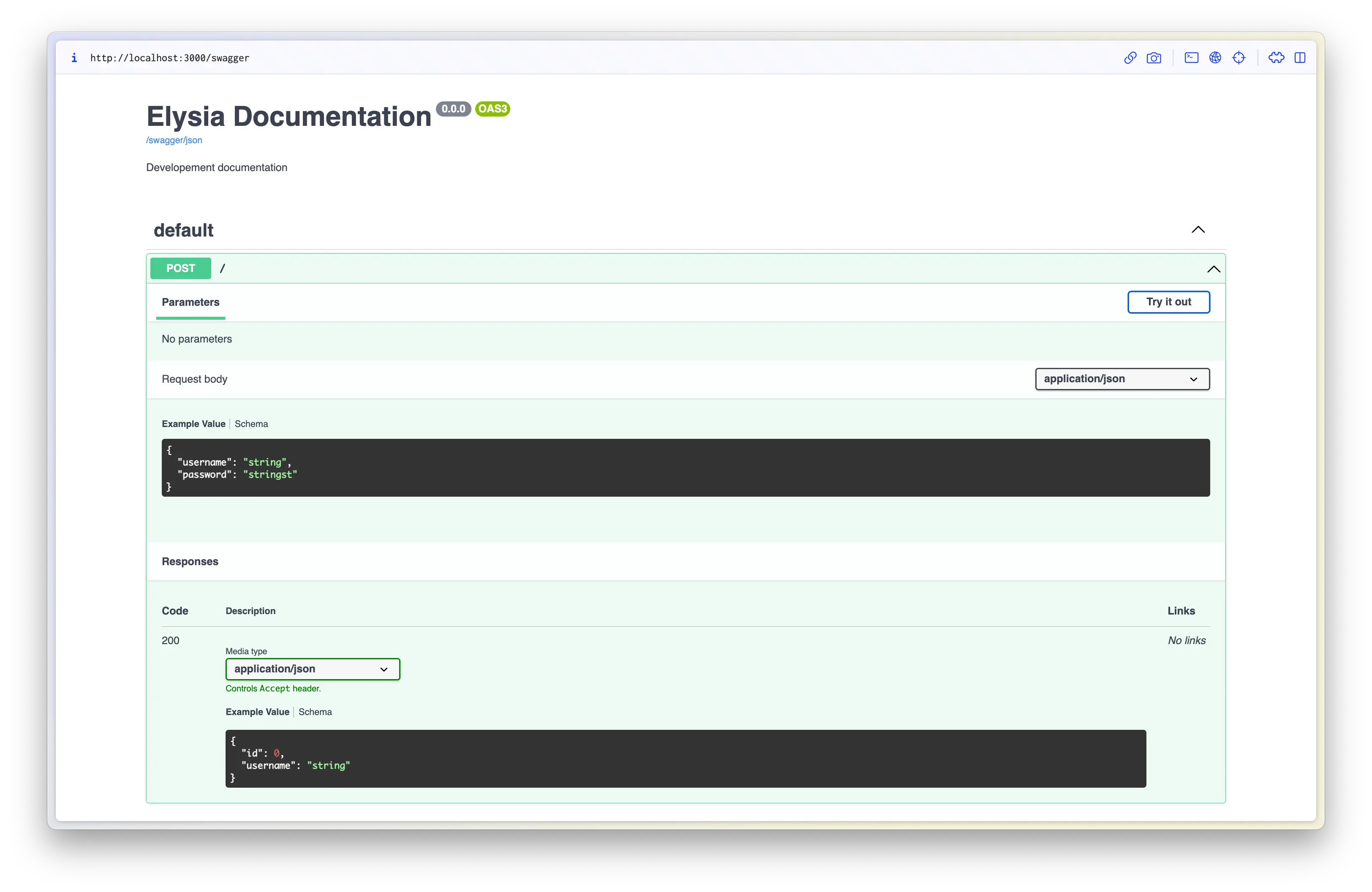
And thanks to defining a strict type for the documentation, we found that we accidentally return the password field from our API, which is not a good idea as it returns private information.
Thanks to Elysia’s type system, we define that the response shouldn’t contain password, which automatically warns us that our Prisma query is returning a password, allowing us to fix that ahead of time.
And if anything more, we don’t have to worry that we might forget a specification of OpenAPI Schema 3.0, as we have auto-completion and type safety too.
We can define our route detail with detail that also follows OpenAPI Schema 3.0, so we can properly create documentation effortlessly.
What’s next
Section titled “What’s next”With the support of Prisma with Bun and Elysia, we are entering a new era of a new level of developer experience.
With Prisma we can accelerate our interaction with databases, while Elysia accelerates our creation of backend web servers in terms of both developer experience and performance.
It’s an absolute joy to work with.
Elysia is on a journey to create a new standard for a better developer experience with Bun for high performance TypeScript servers that can match the performance of Go and Rust.
If you’re looking for a place to start learning about Bun, consider taking a look at what Elysia can offer especially with an end-to-end type safety like tRPC but built on REST standard without any code generation.
If you’re interested in Elysia, feel free to check out our Discord server or see Elysia on GitHub.